

NOTE: Skills management is available only to administrators and global content editors (users with no hierarchy level assigned).
The Skills dashboard
You can access the Skills dashboard from the menu on the left.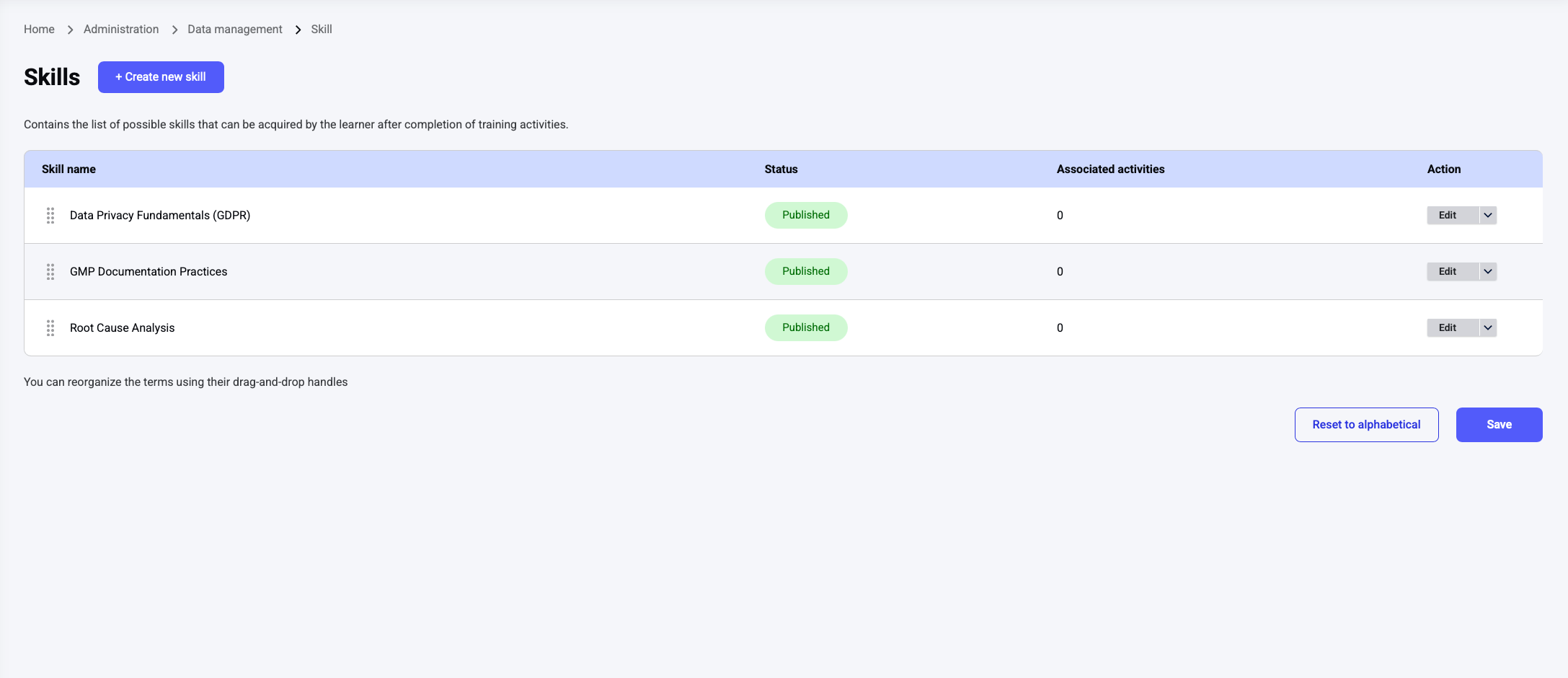
- Skill name
- Status: Active or Disabled.
- Associated activities: The number of activities the skill is assigned to. Click the number to open a popup listing those activities.
- Actions: Edit, Disable, or Enable (see below).
Creating a skill
Click the Create new skill button at the top of the dashboard and define the skill’s name. Optionally, you can also:- Select a parent skill to nest the skill under an existing one. Leave it empty to create a top-level skill.
- Select prerequisite skills (top-level skills only, see Prerequisites).
- Assign a hierarchy level to the skill (not mandatory). When a skill has a hierarchy level:
- Content managers can select skills at the same or lower levels.
- Only learners at the same or higher levels can see the skill.
How skills are organized
Skills form a tree:- Each skill has one parent at most. A skill can never sit under two different parents.
- A skill without a parent is a top-level skill: the root of its own branch. Only top-level skills can be added to skills profiles.
- A skill’s sub-skills must all be acquired (or claimed) before a learner can work on the skill itself. Every skill, with or without sub-skills, has its own training and quiz.
Prerequisites
A prerequisite links two top-level skills: a learner must complete the whole branch of the prerequisite skill (the skill and all its sub-skills) before starting anything in the branch of the dependent skill.- The Prerequisite skills field is displayed only for top-level skills, and only top-level skills can be selected.
- A skill can have several prerequisites. All of them must be completed.
- Circular dependencies are blocked: if skill A is a prerequisite of skill B, B cannot become a prerequisite of A, directly or through a chain.
Editing a skill
Click the Edit action next to a skill to update it. You can change the skill framework (skills, parents and prerequisites) at any time. Changes never remove skills that learners have already acquired:- Acquired skills are kept whatever the change.
- A new sub-skill added below a skill the learner has already completed is ignored for that learner. If it is added in a part of the branch the learner has not completed yet, it becomes part of their gap.
- A new prerequisite is ignored for learners who have already completed the dependent skill’s branch. For learners who have only started it, the new prerequisite applies to the rest of the branch.
NOTE: You cannot move a top-level skill under a parent while it is used as a target skill in a skills profile or declared as a prerequisite of another skill. Remove those links first.
Enabling and disabling skills
Use the Disable and Enable actions to control whether a skill is active.- A skill can be disabled only if it is not assigned to any activity.
- A disabled skill is no longer part of learners’ skills gaps.
- Disabled skills remain visible in the acquired skills of learners who have already earned them.
- Re-enabling a previously disabled skill does not reassociate it with the activities it was linked to before.
Assigning skills to activities
You can also associate skills with activities, so that learners acquire them through their regular trainings. You do this when creating or editing an activity, not from the Skills dashboard.- In the activity interface, toggle on Assign skills.
- Select up to 3 skills using the autocomplete field, or click Assign skills with AI to let Opigno AI detect the applicable skills.
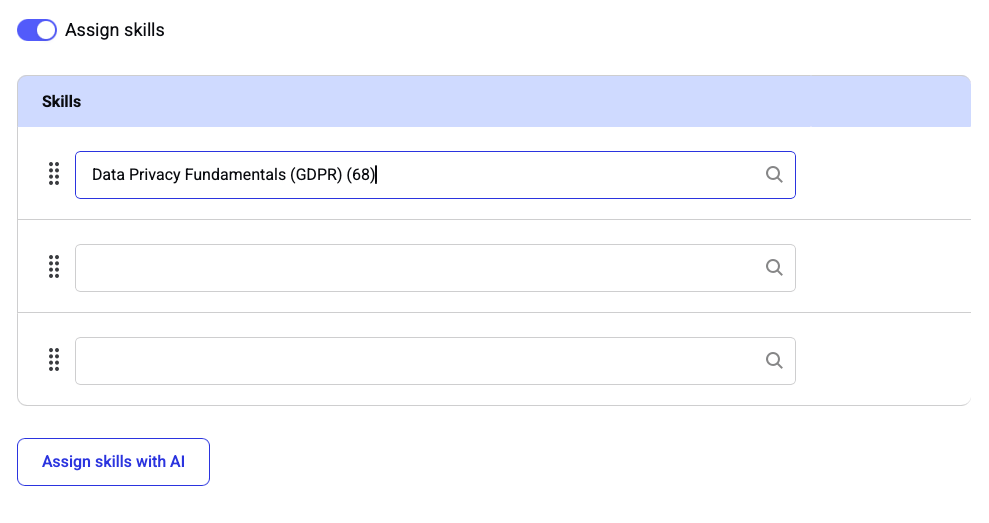
NOTE: New skills cannot be created from the activity interface — only existing skills can be assigned.
Acquiring a skill through activities
A learner acquires a skill once they answer 3 consecutive activities associated with that skill correctly — meaning a score above 90% on each. The skill is then set to Acquired (100%), whatever its criticality. The following rules apply:- If a learner repeats an activity, it is counted only once toward a skill.
- If new skills are added to an activity a learner has already completed and they repeat it, only the newly added skills are considered.
- Once acquired, a skill is never lost — for example, if the learner restarts the training, takes another training containing the same activity, or later answers that activity incorrectly.
NOTE: Skills cannot be acquired from activities that belong to a theory module.