> ## Documentation Index
> Fetch the complete documentation index at: https://docs.opigno.com/llms.txt
> Use this file to discover all available pages before exploring further.
# Battles
Battles are asynchronous head-to-head games between two learners. Each participant independently answers the same set of randomly selected questions at their own pace. The winner is determined first by score; if both players have the same score, the one who spent less total time wins.
**NOTE:** Battles are built on questions from the shared question bank. If you haven't set up questions yet, see [**Questions**](https://docs.opigno.com/questions) before proceeding.
Unlike challenges, battles are initiated by learners. When a learner starts a battle, they choose a domain, and questions are then **randomly drawn** from all questions in that domain.
**NOTE:** A domain must have at least 5 questions to be selectable for a battle.
Learners can select domains available only at their hierarchy or levels below.
The only constraint is that
Battles are managed under **Tools > Gamification**. You will find two menu items:
* **Battle statistics**: View the leaderboard of users who have taken battles
* **Battle settings**: Configure scoring rules and display preferences
## Battle statistics
**NOTE:** Only users with the **administrator** and **content editor** roles can access battle statistics.
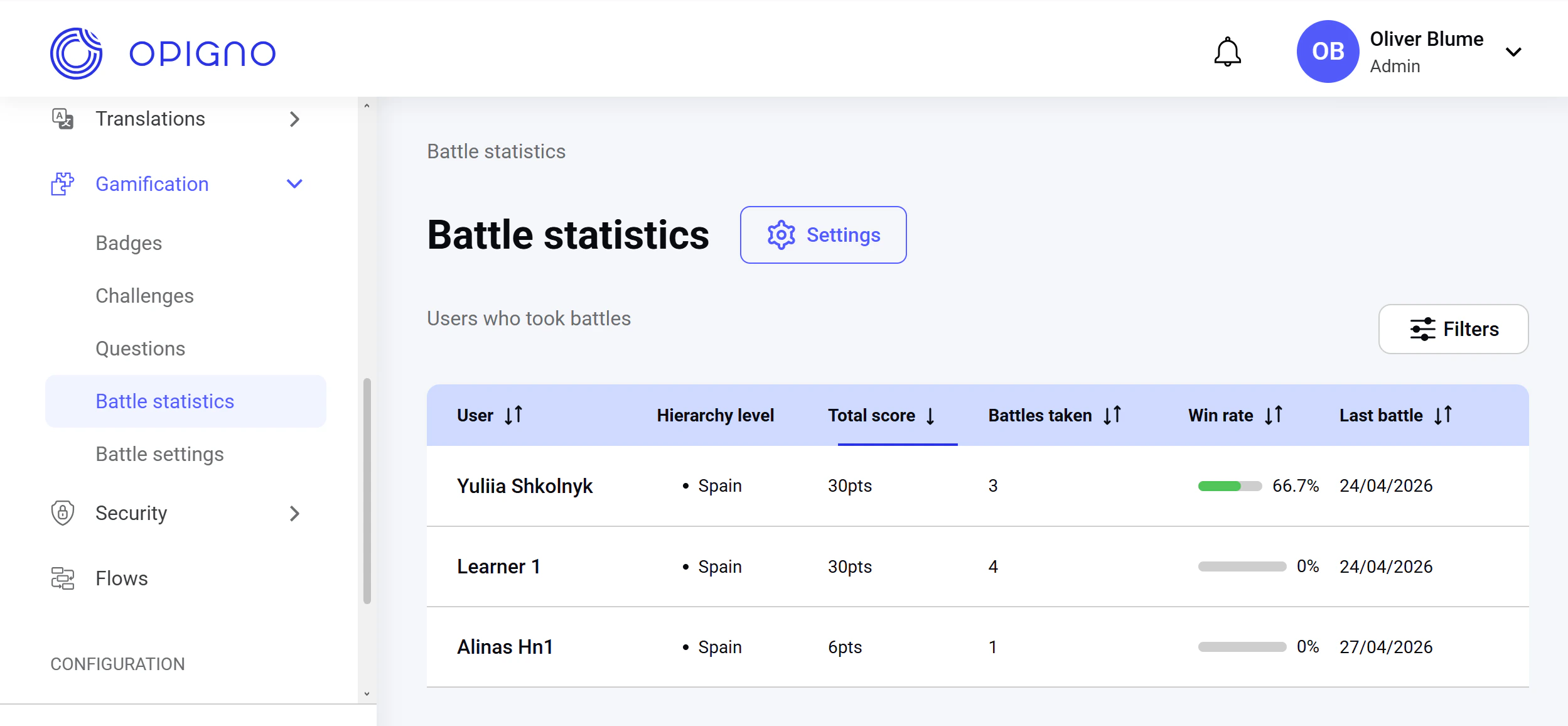 The battle statistics dashboard displays a leaderboard of all learners who have taken battles, with the following attributes:
* **User**
* **Hierarchy level**
* **Total score**
* **Number of battles taken**
* **Win rate (%)**
* **Date of the most recent battle**
You can filter the list by user name, hierarchy level, and the date range.
**NOTE:** Content editors can see learners only at their hierarchy or levels below.
## Battle settings
You can access battle settings either via the **Settings** button in the Battle statistics dashboard or via the **Battle settings** on the left-hand menu.
**NOTE:** Only users with the **administrator** role can manage battle settings.
The battle statistics dashboard displays a leaderboard of all learners who have taken battles, with the following attributes:
* **User**
* **Hierarchy level**
* **Total score**
* **Number of battles taken**
* **Win rate (%)**
* **Date of the most recent battle**
You can filter the list by user name, hierarchy level, and the date range.
**NOTE:** Content editors can see learners only at their hierarchy or levels below.
## Battle settings
You can access battle settings either via the **Settings** button in the Battle statistics dashboard or via the **Battle settings** on the left-hand menu.
**NOTE:** Only users with the **administrator** role can manage battle settings.
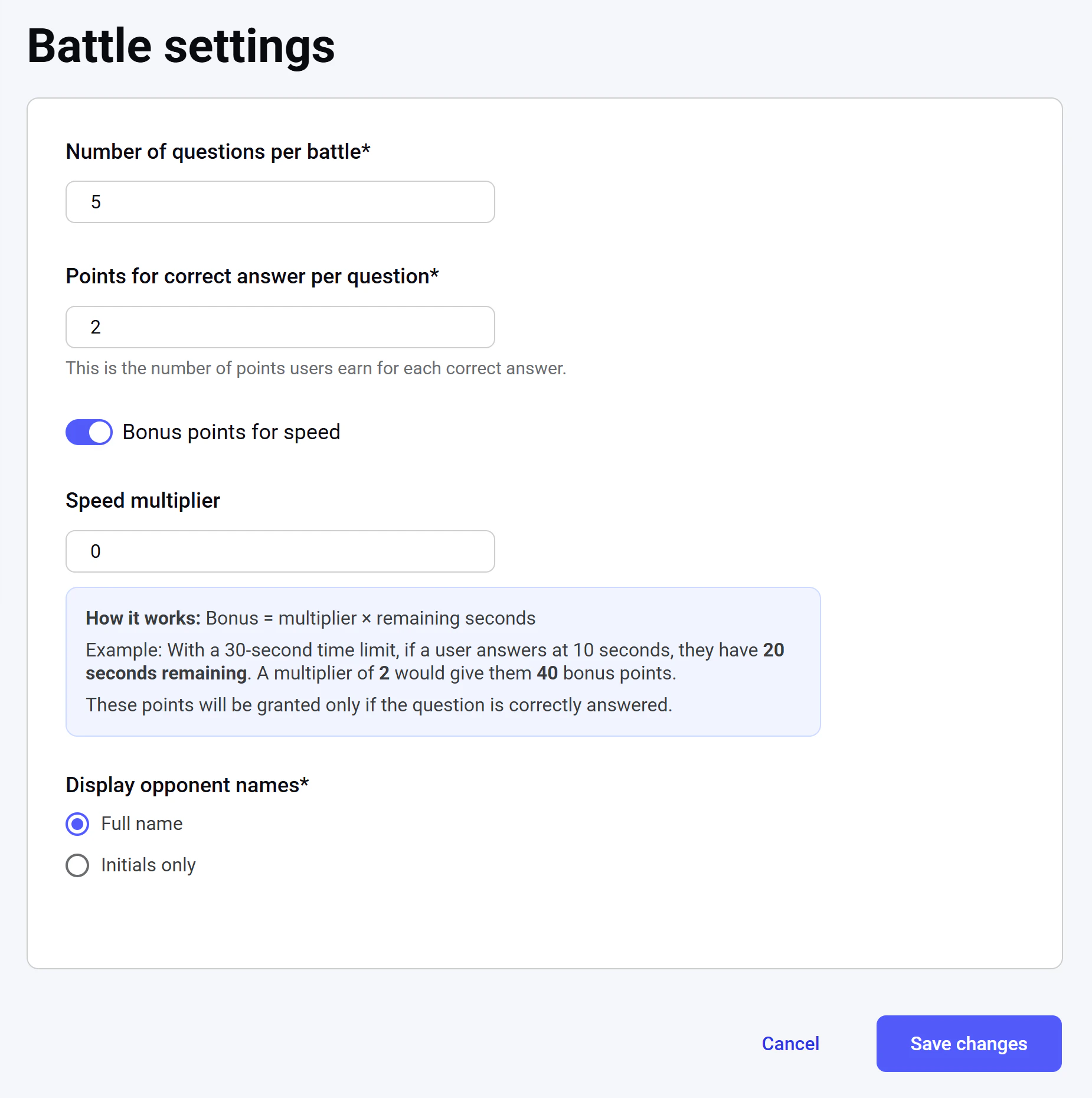 Here, you can configure the global battle settings:
* **Number of questions per battle. It's a required field.**
* **Points for a correct answer**: The base number of points awarded for each correctly answered question. **It's a required field.**
* **Bonus points for speed**: If enabled, learners earn extra points based on the number of seconds remaining from the question's time limit. If the multiplier is set to 0, the time-based bonus is disabled.
**NOTE:** The time limit for each question is **set individually** when creating or editing a question. To learn more about creating new questions, see [**Creating a new question**](https://docs.opigno.com/challenges#creating-a-new-question). Bonus points are awarded **only for correct answers**.
* **Display opponent names**: Choose whether opponents are shown by their full names or initials only. This setting applies everywhere opponents are mentioned: in battle listings, result pages, opponent selection, and notifications. User pictures are always displayed regardless of this setting. **It's a required field.**
Here, you can configure the global battle settings:
* **Number of questions per battle. It's a required field.**
* **Points for a correct answer**: The base number of points awarded for each correctly answered question. **It's a required field.**
* **Bonus points for speed**: If enabled, learners earn extra points based on the number of seconds remaining from the question's time limit. If the multiplier is set to 0, the time-based bonus is disabled.
**NOTE:** The time limit for each question is **set individually** when creating or editing a question. To learn more about creating new questions, see [**Creating a new question**](https://docs.opigno.com/challenges#creating-a-new-question). Bonus points are awarded **only for correct answers**.
* **Display opponent names**: Choose whether opponents are shown by their full names or initials only. This setting applies everywhere opponents are mentioned: in battle listings, result pages, opponent selection, and notifications. User pictures are always displayed regardless of this setting. **It's a required field.**