> ## Documentation Index
> Fetch the complete documentation index at: https://docs.opigno.com/llms.txt
> Use this file to discover all available pages before exploring further.

# My Learning interface

*My Learning* is a personalized dashboard where the user can easily access all
enrolled courses, track their progress, view upcoming events, check social activity and earned rewards.
It serves as a main page to stay organized and motivated on the learning journey.

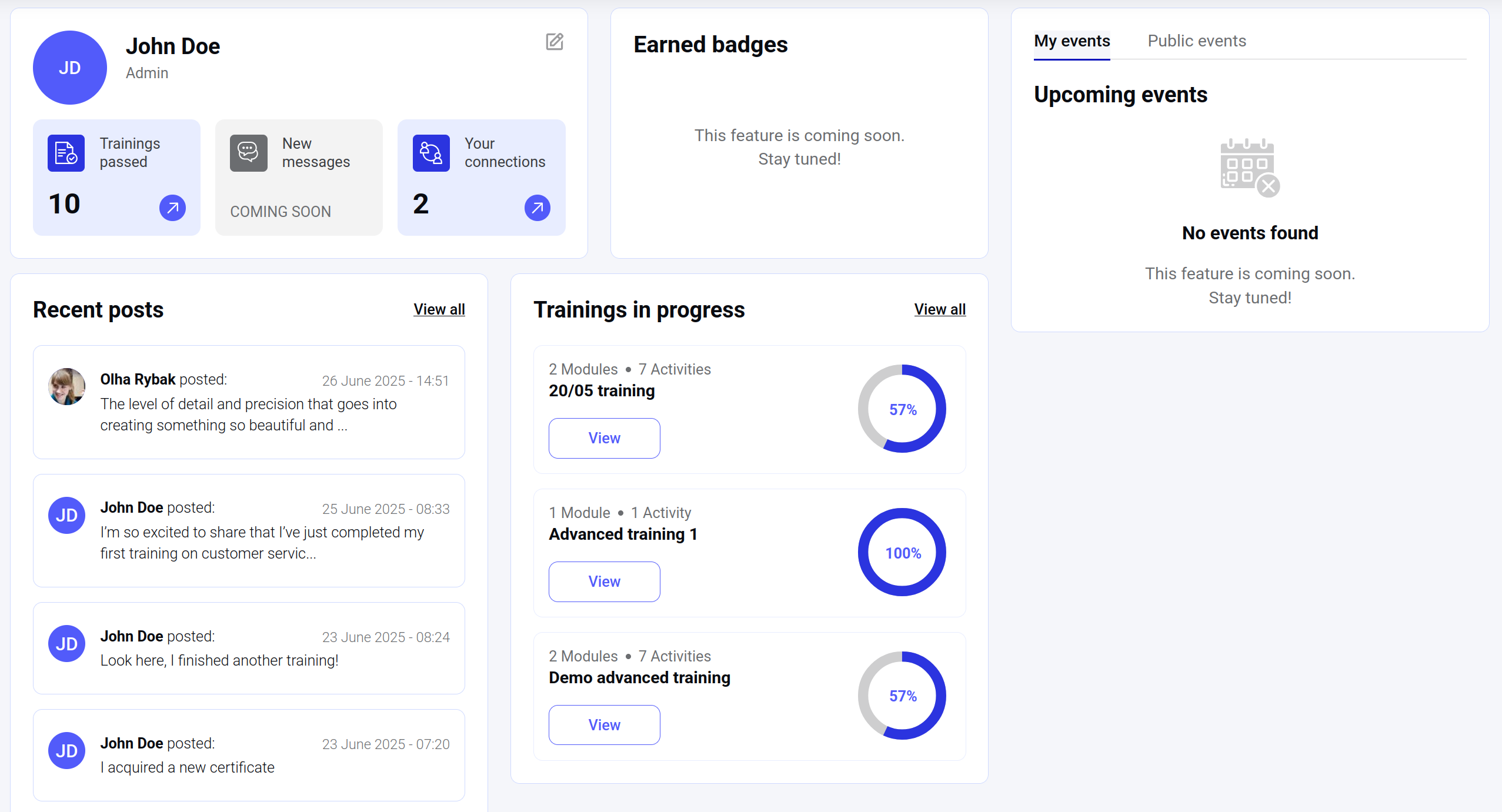
Here is an example of *My Learning* interface that is implemented using Opigno Enterprise API:

<img style={{ borderRadius:"0.3rem" }} src="https://mintcdn.com/connect-i/duHonZHPe3F63_yi/images/my_learning.png?fit=max&auto=format&n=duHonZHPe3F63_yi&q=85&s=7a2ab9e630e282a9eea3813d81970ebd" alt="My learning" title="My learning" width="2554" height="1381" data-path="images/my_learning.png" />

Let's check more precisely what queries were used to build this page.

## "Trainings passed" block

The block represents the number of the trainings that were successfully completed by the current user.

The main query to work with training listings is [`getCatalogData`](/OpignoEnterpriseAPI/RetrieveCatalog) that can be modified with the [filters](/OpignoEnterpriseAPI/FilteringCatalogItems).

<CodeGroup>
  ```filename GraphQL theme={null}
    query getCatalogData {
      getCatalogData(first: 1, filters: [{key: "filter_status", value: ["PASSED"]}]) {
        totalItems
      }
    }
  ```

  ```File Query result [expandable] theme={null}
    {
      "data": {
        "getCatalogData": {
          "totalItems": 10
        }
      }
    }
  ```
</CodeGroup>

<Note>
  Different filters can be combined in `getCatalogData` query to achieve different goals.
  For example, to get **all** trainings that were started or ever finished by the user, you should use the same `filter_status`
  with the following combination of values: `["IN_PROGRESS", "COMPLETED", "EXPIRED"]`.
</Note>

Another example of the same query usage is "Trainings in progress" block.

## "Trainings in progress" block

The block contains the list of trainings that were started by the current API user, but not finished yet.

<CodeGroup>
  ```filename GraphQL theme={null}
    query getCatalogData {
      getCatalogData(first: 3, filters: [{key: "filter_status", value: ["IN_PROGRESS"]}]) {
        edges {
          node {
            cta {
              actionId
              title
              arguments {
                key
                value
              }
              metadata {
                key
                value
              }
            }
            modulesNumber
            activitiesNumber
            training {
              title
              attempt {
                metrics {
                  progress
                }
              }
            }
          }
        }
      }
    }
  ```

  ```File Query result [expandable] theme={null}
    {
      "data": {
        "getCatalogData": {
          "edges": [
            {
              "node": {
                "cta": [
                  {
                    "actionId": "VIEW_LP",
                    "title": "View",
                    "arguments": [
                      {
                        "key": "lpId",
                        "value": "71"
                      }
                    ],
                    "metadata": []
                  }
                ],
                "modulesNumber": 2,
                "activitiesNumber": 7,
                "training": {
                  "title": "20/05 training",
                  "attempt": {
                    "metrics": {
                      "progress": 57
                    }
                  }
                }
              }
            },
            {
              "node": {
                "cta": [
                  {
                    "actionId": "VIEW_LP",
                    "title": "View",
                    "arguments": [
                      {
                        "key": "lpId",
                        "value": "56"
                      }
                    ],
                    "metadata": []
                  }
                ],
                "modulesNumber": 1,
                "activitiesNumber": 1,
                "training": {
                  "title": "Advanced training 1",
                  "attempt": {
                    "metrics": {
                      "progress": 100
                    }
                  }
                }
              }
            },
            {
              "node": {
                "cta": [
                  {
                    "actionId": "VIEW_LP",
                    "title": "View",
                    "arguments": [
                      {
                        "key": "lpId",
                        "value": "57"
                      }
                    ],
                    "metadata": []
                  }
                ],
                "modulesNumber": 2,
                "activitiesNumber": 7,
                "training": {
                  "title": "Demo advanced training",
                  "attempt": {
                    "metrics": {
                      "progress": 57
                    }
                  }
                }
              }
            }
          ]
        }
      }
    }
  ```
</CodeGroup>

<Note>
  In the example above a progress for the second training ("Advanced training 1") is 100%,
  but it's still in status "In progress". This is ok, because the training contains not attended [live sessions](/OpignoEnterpriseAPI/LiveSession).
</Note>

## "Your connections" block

This block is a part of Opigno social features and shows the number of user connections is the current user's network.

To retrieve this information, [`getUserConnectionsNetwork`](/OpignoEnterpriseAPI/UserConnection/GetUserConnectionsNetwork) should be used:

<CodeGroup>
  ```filename GraphQL theme={null}
    query getUserConnectionsNetwork {
      getUserConnectionsNetwork(first: 1) {
        totalItems
      }
    }
  ```

  ```File Query result [expandable] theme={null}
    {
      "data": {
        "getUserConnectionsNetwork": {
          "totalItems": 2
        }
      }
    }
  ```
</CodeGroup>

## "Recent posts" block

Another block that is the part of Opigno social features. It represents the list of the newest posts
that were created by the current user or other users from the network.

To get this data, [`getPostsFeed`](/OpignoEnterpriseAPI/Post/GetPostsFeed) query should be used:

<CodeGroup>
  ```filename GraphQL theme={null}
    query getPostsFeed {
      getPostsFeed(first: 4) {
        edges {
          node {
            text
            created
              authorUserContext {
                uuid
              }
            }
          }
        }
      }
  ```

  ```File Query result [expandable] theme={null}
    {
      "data": {
        "getPostsFeed": {
          "edges": {
            "node": {
              "text": "<p>The level of detail and precision that goes into creating something so beautiful and exclusive is honestly mind-blowing. Every element speaks volumes about quality and sophistication</p>\n"
              "created": 1750938690
              "authorUserContext": {
                "uuid": "5acfc440-88e0-4286-b089-c0f03575ed9a"
              }
            }
            "node": {
              "text": "<p>I’m so excited to share that I’ve just completed my first training on customer service! The learning experience was incredible – interactive, hands-on, and packed with valuable insights. I loved diving deep into the details of how exclusive products are created and understanding what sets them apart. What course have you completed, and what’s been your favorite part? Let’s share our experiences!</p>\n"
              "created": 1750829604
              "authorUserContext": {
                "uuid": "fddab9cc-9379-4e39-b058-5709f0915ace"
              }
            }
            "node": {
              "text": "<p>Look here, I finished another training!</p>\n"
              "created": 1750656276
              "authorUserContext": {
                "uuid": "fddab9cc-9379-4e39-b058-5709f0915ace"
              }
            }
            "node": {
              "text": "<p>I acquired a new certificate</p>\n"
              "created": 1750648836
              "authorUserContext": {
                "uuid": "fddab9cc-9379-4e39-b058-5709f0915ace"
              }
            }
          }
        }
      }
    }
  ```
</CodeGroup>
