> ## Documentation Index
> Fetch the complete documentation index at: https://docs.opigno.com/llms.txt
> Use this file to discover all available pages before exploring further.
# Custom API Usage
## **Adding custom training fields**
Users with **Administrator** role can use:
Trainings
Training settings
*Trainings -> Training settings* menu item to add custom fields of the following types to the Training entity (`opigno_training`):
* text fields (`string`, `string_long`, `text_long`)
* numeric fields (`float`, `decimal`, `integer`)
* boolean
* entity reference (only taxonomy term)
* selection list (`list_string`, `list_integer`, `list_float`)
**Note**
API structure of the field depends on its cardinality and settings. It's important to clear the Drupal cache every time when the field configuration is changed.
Once the field is added, it will immediately appear on the learning path form (field display settings can be updated using *Manage form display* tab on *Trainings -> Training settings* page:
*Manage form display* tab on *Trainings*
*Training settings*
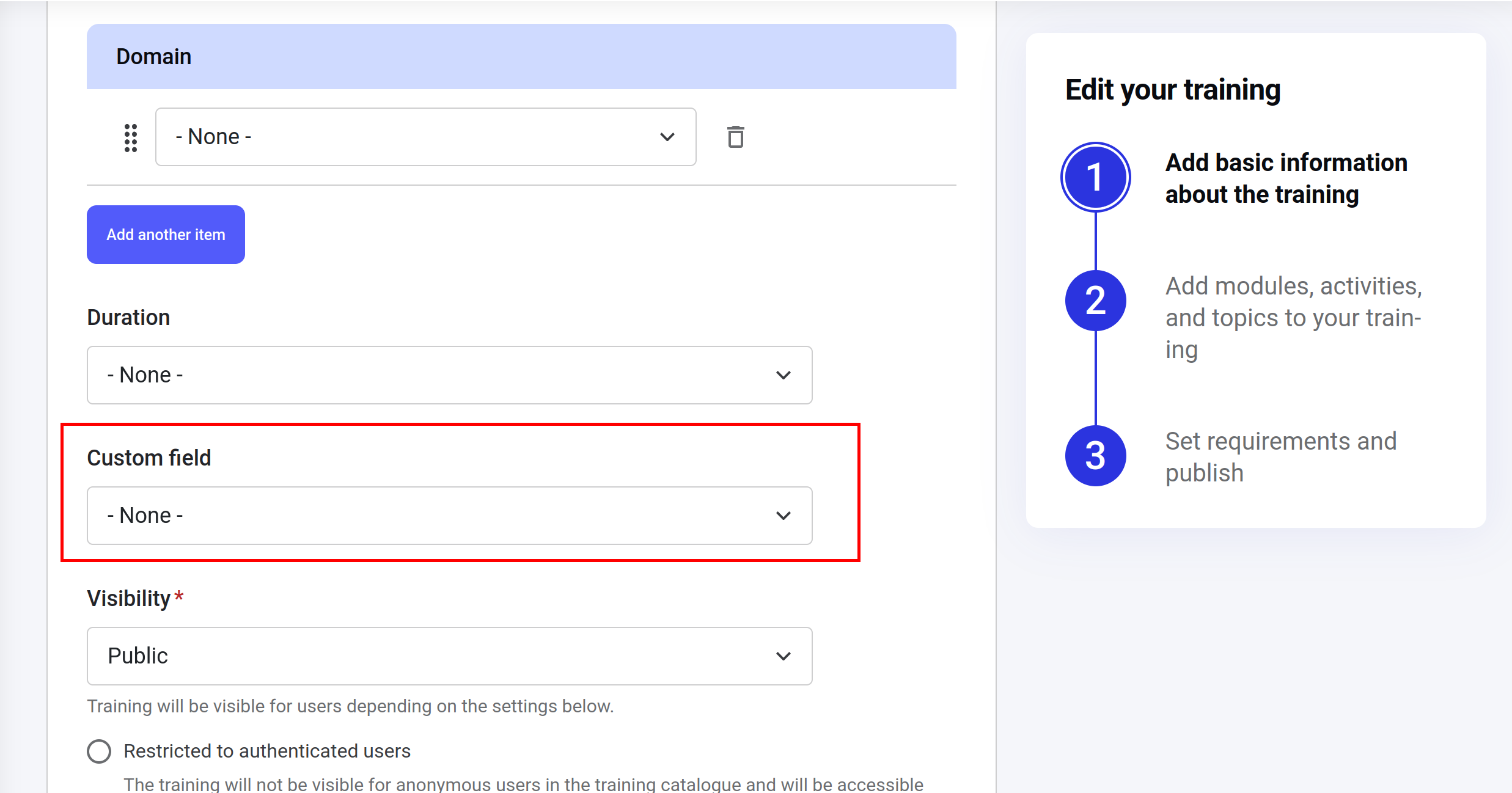 ## Using custom training fields in Opigno Enterprise API
The field will appear in API under the Training object **after the Drupal cache clearing**. The field name in the API will be the same as the Drupal machine name, without *field*\_ prefix. For example, if the machine name is `field_custom_field` then in API it will appear as `custom_field`.
```graphql GraphQL theme={null}
query getLearningPath {
getLearningPath(lpId: "40") {
training {
custom_field {
id
name
weight
}
}
}
}
```
```json Response theme={null}
{
"data": {
"getLearningPath": {
"training": {
"custom_field": [
{
"id": "13",
"name": "tag1",
"weight": 0
}
]
}
}
}
}
```
## Using custom fields as catalog filters
Fields of the following types will be automatically available as the catalog filters:
1. *entity\_reference* that implements a reference to taxonomy terms;
2. *list\_string*;
3. *list\_integer*;
4. *list\_float*.
The filter name in the API will be generated based on the Drupal machine name without *field*\_ prefix. For example, if the machine name is `field_custom_field` then in API an appropriate filter name will be `filter_custom_field`.
```graphql GraphQL theme={null}
query getCatalogFilters {
getCatalogFilters {
id
label
formElementType
filterFormSection
options {
key
value
weight
}
}
}
```
```json Response [expandable] theme={null}
{
"data": {
"getCatalogFilters": [
{
"id": "filter_search",
"label": "Search",
"formElementType": "TEXTFIELD",
"filterFormSection": "filter_list",
"options": null
},
{
"id": "filter_duration",
"label": "Duration",
"formElementType": "CHECKBOXES",
"filterFormSection": "filter_list",
"options": [
{
"key": "3",
"value": "30min",
"weight": 3
},
{
"key": "4",
"value": "40min",
"weight": 4
}
]
},
{
"id": "filter_domain",
"label": "Domains",
"formElementType": "CHECKBOXES",
"filterFormSection": "filter_list",
"options": [
{
"key": "1",
"value": "Domain 1",
"weight": 0
},
{
"key": "2",
"value": "Domain 2",
"weight": 1
}
]
},
{
"id": "filter_custom_field",
"label": "Custom field",
"formElementType": "CHECKBOXES",
"filterFormSection": "filter_list",
"options": [
{
"key": "13",
"value": "tag1",
"weight": 0
},
{
"key": "16",
"value": "tag 2",
"weight": 0
}
]
}
]
}
}
```
## Using custom training fields in Opigno Enterprise API
The field will appear in API under the Training object **after the Drupal cache clearing**. The field name in the API will be the same as the Drupal machine name, without *field*\_ prefix. For example, if the machine name is `field_custom_field` then in API it will appear as `custom_field`.
```graphql GraphQL theme={null}
query getLearningPath {
getLearningPath(lpId: "40") {
training {
custom_field {
id
name
weight
}
}
}
}
```
```json Response theme={null}
{
"data": {
"getLearningPath": {
"training": {
"custom_field": [
{
"id": "13",
"name": "tag1",
"weight": 0
}
]
}
}
}
}
```
## Using custom fields as catalog filters
Fields of the following types will be automatically available as the catalog filters:
1. *entity\_reference* that implements a reference to taxonomy terms;
2. *list\_string*;
3. *list\_integer*;
4. *list\_float*.
The filter name in the API will be generated based on the Drupal machine name without *field*\_ prefix. For example, if the machine name is `field_custom_field` then in API an appropriate filter name will be `filter_custom_field`.
```graphql GraphQL theme={null}
query getCatalogFilters {
getCatalogFilters {
id
label
formElementType
filterFormSection
options {
key
value
weight
}
}
}
```
```json Response [expandable] theme={null}
{
"data": {
"getCatalogFilters": [
{
"id": "filter_search",
"label": "Search",
"formElementType": "TEXTFIELD",
"filterFormSection": "filter_list",
"options": null
},
{
"id": "filter_duration",
"label": "Duration",
"formElementType": "CHECKBOXES",
"filterFormSection": "filter_list",
"options": [
{
"key": "3",
"value": "30min",
"weight": 3
},
{
"key": "4",
"value": "40min",
"weight": 4
}
]
},
{
"id": "filter_domain",
"label": "Domains",
"formElementType": "CHECKBOXES",
"filterFormSection": "filter_list",
"options": [
{
"key": "1",
"value": "Domain 1",
"weight": 0
},
{
"key": "2",
"value": "Domain 2",
"weight": 1
}
]
},
{
"id": "filter_custom_field",
"label": "Custom field",
"formElementType": "CHECKBOXES",
"filterFormSection": "filter_list",
"options": [
{
"key": "13",
"value": "tag1",
"weight": 0
},
{
"key": "16",
"value": "tag 2",
"weight": 0
}
]
}
]
}
}
```