> ## Documentation Index
> Fetch the complete documentation index at: https://docs.opigno.com/llms.txt
> Use this file to discover all available pages before exploring further.
# Certificate
## **Working with certificates in the backoffice**
Users with the dedicated permissions can create certificate templates and attach them to a learning path in the backoffice.
To add a new certificate template or edit existing ones, navigate to *Certificates → Manage certificates* section in the admin menu.
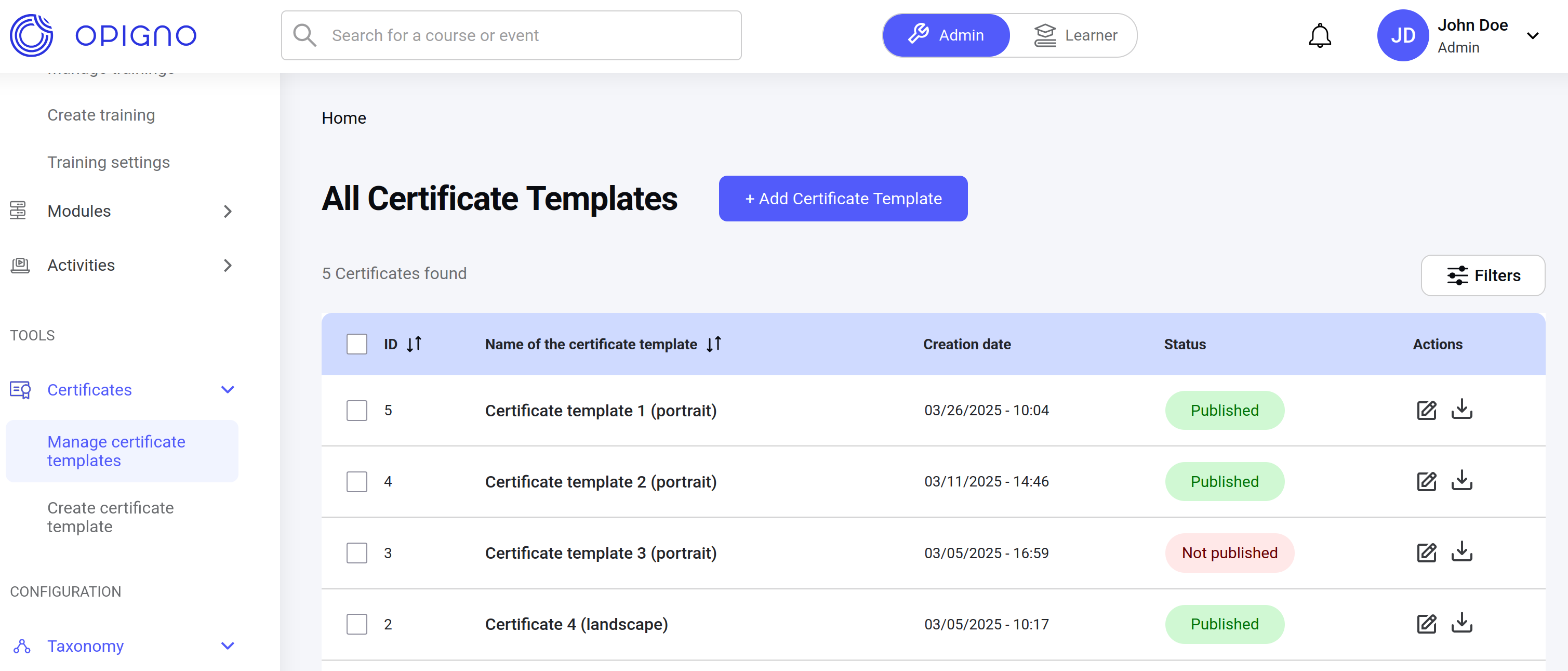 Once the template is created, it can be used in the learning path. An appropriate settings are available on the *Passing requirements* step of the learning path creation/editing process:
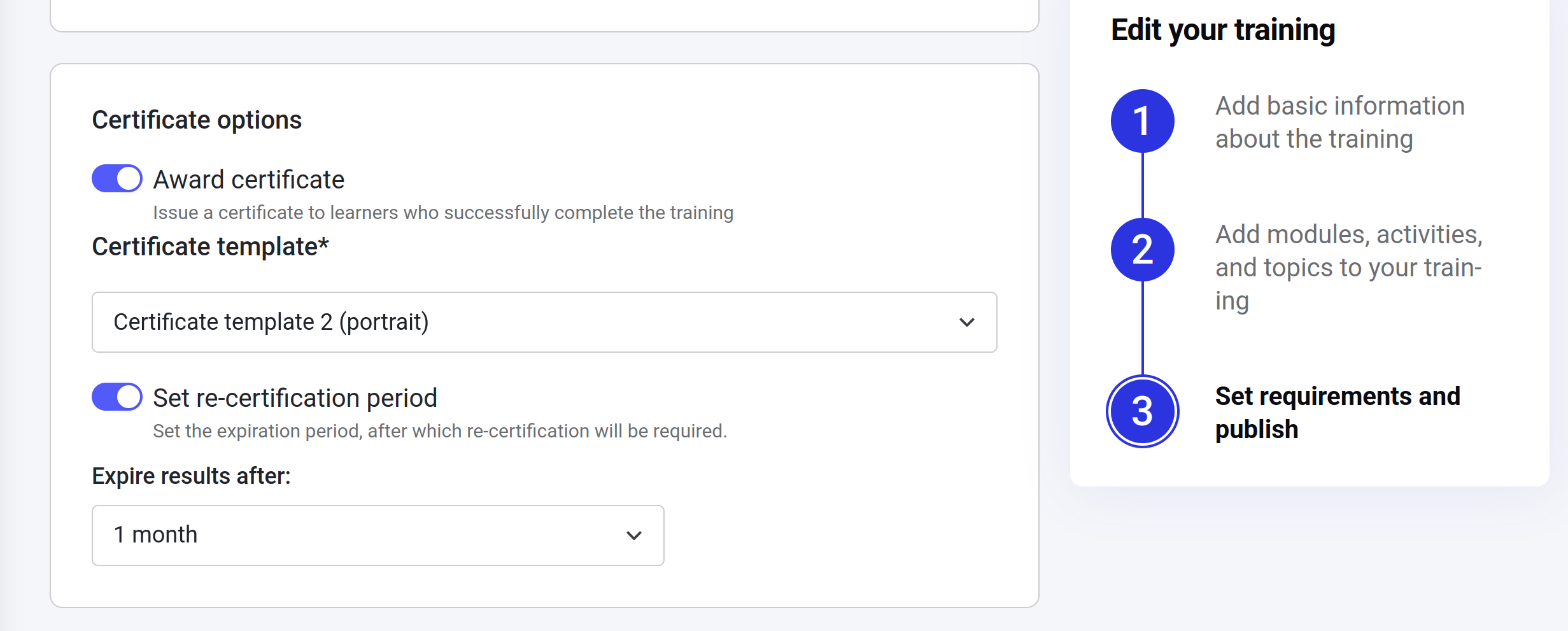 Now when the certification is enabled in the learning path, every user who successfully completed (passed) the training, will earn a certificate that will be generated according to the attached template.
If the re-certification period is set, the training attempt will be considered as expired after the selected period and the user will be able to restart the training. The previously earned certificate will also be marked as expired, but still accessible by the user with the possibility to download it.
**Note**
If the certification options are changed in the learning path settings, the new revision will be created and, once it is published, will be accessible for the users.
## **API usage**
Information about the available certification for the learning path can be taken from the API under the `LearningPath` object:
```filename GraphQL theme={null}
query getLearningPath {
getLearningPath(lpId: "40") {
certificationEnabled
}
}
```
```File Query result theme={null}
{
"data": {
"getLearningPath": {
certificationEnabled: true
}
}
}
```
Below is an example how to get the list of all certificates that are earned by the given user. The list of results will always be sorted descending by the date (newest first).
There are two extra parameters that can be used in this query:
1. `status` - can be used as a filter to get only active or expired certificates. Can be one of the following values:
1. VALID
2. EXPIRED
2. `relatedEntityId` - ID of the learning path entity the certificate relates to. Can be used get the certificate history for a single learning path.
```filename GraphQL theme={null}
query getUserCertificates {
getUserCertificates {
id
status
validationDate
expirationDate
downloadUrl
relatedEntity {
id
training {
title
}
}
}
}
```
```File Query result [expandable] theme={null}
{
"data": {
"getUserCertificates": [
{
"id": "25",
"status": "VALID",
"validationDate": 1743005830,
"expirationDate": 1745684230,
"downloadUrl": "http://backoffice-site.url/opigno-certificate/export/25/pdf/1743016278/3pkg4x6BvD8Uk8sUYpFgtj3ASuKGYwg2UThTTWedb40",
"relatedEntity": {
"id": "48",
"training": {
"title": "How far would you go for a Nespresso coffee?"
}
}
},
{
"id": "20",
"status": "VALID",
"validationDate": 1742912723,
"expirationDate": null,
"downloadUrl": "http://backoffice-site.url/opigno-certificate/export/20/pdf/1743016278/rWCKy2oXeiyV5XqeQ3XDgkgQTnwdh1Z3RLv9NvBo2Ho",
"relatedEntity": {
"id": "41",
"training": {
"title": "Locked navigation Learning Path 2"
}
}
},
{
"id": "19",
"status": "EXPIRED",
"validationDate": 1742911810,
"expirationDate": 1742880087,
"downloadUrl": "http://backoffice-site.url/opigno-certificate/export/19/pdf/1743016278/CDLD4wDif7jZ0RQLKfImPe6Dx_cFYYNLgSWMqH2FZj8",
"relatedEntity": {
"id": "41",
"training": {
"title": "Locked navigation Learning Path 2"
}
}
}
]
}
}
```
**Note**
A certificate download link has an expiration lifetime - 1hour.
## **Fetching latest certificates earned per Learning Path**
The `getUserCertificates` method retrieves all certificates associated with a user. This may include multiple certificates earned for different versions of the same Learning Path. All certificates are returned, regardless of the specific version they were issued for.\
\
To fetch only the most recently earned certificates, use the `getPaginatedUserCertificates` query in combination with a cursor-based pagination object `pageInfo`. For details on implementing cursor-based pagination, refer to the [Paginating Catalog Items](/OpignoEnterpriseAPI/PaginatingCatalogItems) section, which includes a comprehensive example of `Cursor` object usage.
```filename GraphQL theme={null}
query getPaginatedUserCertificates {
getPaginatedUserCertificates (first: 3) {
edges {
node {
id
status
validationDate
expirationDate
downloadUrl
relatedEntity {
id
training {
title
}
}
}
}
pageInfo {
hasNextPage
startCursor
endCursor
}
}
}
```
```File Query result theme={null}
{
"data": {
"getPaginatedUserCertificates": {
"edges": [
{
"node": {
"id": "10",
"status": "VALID",
"validationDate": 1742900754,
"expirationDate": null,
"downloadUrl": "http://backoffice-site.url/opigno-certificate/export/10/pdf/1750337726/RhBDDjldhpMVRmaqeyUPfKQF9fNwUe1GZM0k7QJ40Yw",
"relatedEntity": {
"id": "43",
"training": {
"title": "How far would you go for a Nespresso coffee?"
}
}
}
},
{
"node": {
"id": "11",
"status": "VALID",
"validationDate": 1742900860,
"expirationDate": null,
"downloadUrl": "http://backoffice-site.url/opigno-certificate/export/11/pdf/1750337726/tJx1bNspdlG3upviFHnl8OD-ztLQ3ezlWIJ9c3dd7OU",
"relatedEntity": {
"id": "43",
"training": {
"title": "How far would you go for a Nespresso coffee?"
}
}
}
},
{
"node": {
"id": "12",
"status": "VALID",
"validationDate": 1742907515,
"expirationDate": null,
"downloadUrl": "http://backoffice-site.url/opigno-certificate/export/12/pdf/1750337726/isWyUCmd9u7_Ap-m8bTOg4Bg5YJXarqfAd4gHw66si8",
"relatedEntity": {
"id": "43",
"training": {
"title": "How far would you go for a Nespresso coffee?"
}
}
}
}
],
"pageInfo": {
"hasNextPage": true,
"startCursor": "TzozMzoiRHJ1cGFsXG9waWdub19hcGlcV3JhcHBlcnNcQ3Vyc29yIjo0OntzOjE0OiIAKgBiYWNraW5nVHlwZSI7czoxODoib3BpZ25vX2NlcnRpZmljYXRlIjtzOjEyOiIAKgBiYWNraW5nSWQiO2k6MTA7czoxMDoiACoAc29ydEtleSI7czoxNToiVkFMSURBVElPTl9EQVRFIjtzOjEyOiIAKgBzb3J0VmFsdWUiO2k6MTc0MjkwMDc1NDt9",
"endCursor": "TzozMzoiRHJ1cGFsXG9waWdub19hcGlcV3JhcHBlcnNcQ3Vyc29yIjo0OntzOjE0OiIAKgBiYWNraW5nVHlwZSI7czoxODoib3BpZ25vX2NlcnRpZmljYXRlIjtzOjEyOiIAKgBiYWNraW5nSWQiO2k6MTI7czoxMDoiACoAc29ydEtleSI7czoxNToiVkFMSURBVElPTl9EQVRFIjtzOjEyOiIAKgBzb3J0VmFsdWUiO2k6MTc0MjkwNzUxNTt9"
}
}
}
}
```
Now when the certification is enabled in the learning path, every user who successfully completed (passed) the training, will earn a certificate that will be generated according to the attached template.
If the re-certification period is set, the training attempt will be considered as expired after the selected period and the user will be able to restart the training. The previously earned certificate will also be marked as expired, but still accessible by the user with the possibility to download it.
**Note**
If the certification options are changed in the learning path settings, the new revision will be created and, once it is published, will be accessible for the users.
## **API usage**
Information about the available certification for the learning path can be taken from the API under the `LearningPath` object:
```filename GraphQL theme={null}
query getLearningPath {
getLearningPath(lpId: "40") {
certificationEnabled
}
}
```
```File Query result theme={null}
{
"data": {
"getLearningPath": {
certificationEnabled: true
}
}
}
```
Below is an example how to get the list of all certificates that are earned by the given user. The list of results will always be sorted descending by the date (newest first).
There are two extra parameters that can be used in this query:
1. `status` - can be used as a filter to get only active or expired certificates. Can be one of the following values:
1. VALID
2. EXPIRED
2. `relatedEntityId` - ID of the learning path entity the certificate relates to. Can be used get the certificate history for a single learning path.
```filename GraphQL theme={null}
query getUserCertificates {
getUserCertificates {
id
status
validationDate
expirationDate
downloadUrl
relatedEntity {
id
training {
title
}
}
}
}
```
```File Query result [expandable] theme={null}
{
"data": {
"getUserCertificates": [
{
"id": "25",
"status": "VALID",
"validationDate": 1743005830,
"expirationDate": 1745684230,
"downloadUrl": "http://backoffice-site.url/opigno-certificate/export/25/pdf/1743016278/3pkg4x6BvD8Uk8sUYpFgtj3ASuKGYwg2UThTTWedb40",
"relatedEntity": {
"id": "48",
"training": {
"title": "How far would you go for a Nespresso coffee?"
}
}
},
{
"id": "20",
"status": "VALID",
"validationDate": 1742912723,
"expirationDate": null,
"downloadUrl": "http://backoffice-site.url/opigno-certificate/export/20/pdf/1743016278/rWCKy2oXeiyV5XqeQ3XDgkgQTnwdh1Z3RLv9NvBo2Ho",
"relatedEntity": {
"id": "41",
"training": {
"title": "Locked navigation Learning Path 2"
}
}
},
{
"id": "19",
"status": "EXPIRED",
"validationDate": 1742911810,
"expirationDate": 1742880087,
"downloadUrl": "http://backoffice-site.url/opigno-certificate/export/19/pdf/1743016278/CDLD4wDif7jZ0RQLKfImPe6Dx_cFYYNLgSWMqH2FZj8",
"relatedEntity": {
"id": "41",
"training": {
"title": "Locked navigation Learning Path 2"
}
}
}
]
}
}
```
**Note**
A certificate download link has an expiration lifetime - 1hour.
## **Fetching latest certificates earned per Learning Path**
The `getUserCertificates` method retrieves all certificates associated with a user. This may include multiple certificates earned for different versions of the same Learning Path. All certificates are returned, regardless of the specific version they were issued for.\
\
To fetch only the most recently earned certificates, use the `getPaginatedUserCertificates` query in combination with a cursor-based pagination object `pageInfo`. For details on implementing cursor-based pagination, refer to the [Paginating Catalog Items](/OpignoEnterpriseAPI/PaginatingCatalogItems) section, which includes a comprehensive example of `Cursor` object usage.
```filename GraphQL theme={null}
query getPaginatedUserCertificates {
getPaginatedUserCertificates (first: 3) {
edges {
node {
id
status
validationDate
expirationDate
downloadUrl
relatedEntity {
id
training {
title
}
}
}
}
pageInfo {
hasNextPage
startCursor
endCursor
}
}
}
```
```File Query result theme={null}
{
"data": {
"getPaginatedUserCertificates": {
"edges": [
{
"node": {
"id": "10",
"status": "VALID",
"validationDate": 1742900754,
"expirationDate": null,
"downloadUrl": "http://backoffice-site.url/opigno-certificate/export/10/pdf/1750337726/RhBDDjldhpMVRmaqeyUPfKQF9fNwUe1GZM0k7QJ40Yw",
"relatedEntity": {
"id": "43",
"training": {
"title": "How far would you go for a Nespresso coffee?"
}
}
}
},
{
"node": {
"id": "11",
"status": "VALID",
"validationDate": 1742900860,
"expirationDate": null,
"downloadUrl": "http://backoffice-site.url/opigno-certificate/export/11/pdf/1750337726/tJx1bNspdlG3upviFHnl8OD-ztLQ3ezlWIJ9c3dd7OU",
"relatedEntity": {
"id": "43",
"training": {
"title": "How far would you go for a Nespresso coffee?"
}
}
}
},
{
"node": {
"id": "12",
"status": "VALID",
"validationDate": 1742907515,
"expirationDate": null,
"downloadUrl": "http://backoffice-site.url/opigno-certificate/export/12/pdf/1750337726/isWyUCmd9u7_Ap-m8bTOg4Bg5YJXarqfAd4gHw66si8",
"relatedEntity": {
"id": "43",
"training": {
"title": "How far would you go for a Nespresso coffee?"
}
}
}
}
],
"pageInfo": {
"hasNextPage": true,
"startCursor": "TzozMzoiRHJ1cGFsXG9waWdub19hcGlcV3JhcHBlcnNcQ3Vyc29yIjo0OntzOjE0OiIAKgBiYWNraW5nVHlwZSI7czoxODoib3BpZ25vX2NlcnRpZmljYXRlIjtzOjEyOiIAKgBiYWNraW5nSWQiO2k6MTA7czoxMDoiACoAc29ydEtleSI7czoxNToiVkFMSURBVElPTl9EQVRFIjtzOjEyOiIAKgBzb3J0VmFsdWUiO2k6MTc0MjkwMDc1NDt9",
"endCursor": "TzozMzoiRHJ1cGFsXG9waWdub19hcGlcV3JhcHBlcnNcQ3Vyc29yIjo0OntzOjE0OiIAKgBiYWNraW5nVHlwZSI7czoxODoib3BpZ25vX2NlcnRpZmljYXRlIjtzOjEyOiIAKgBiYWNraW5nSWQiO2k6MTI7czoxMDoiACoAc29ydEtleSI7czoxNToiVkFMSURBVElPTl9EQVRFIjtzOjEyOiIAKgBzb3J0VmFsdWUiO2k6MTc0MjkwNzUxNTt9"
}
}
}
}
```